Thursday, April 24, 2014

POM 360

Checkout the cool implementation of automatic textarea resize in (POM360.js) after:
  • Window resize
  • Tab change
  • Show/Hide of footer
tricks used:
  • $(window).resize(fn)
  • $rootScope.$on('$stateChangeSuccess', fn() {setTimeout(fn, 0)});
  • track show/hide of detail footer


Implemented using:
  • node webkit
  • AngularJS
    • UI router
  • bootstrap
How to run:

> nw POM236NW.nw


Tuesday, April 22, 2014

Friday, April 18, 2014

GitChrome Package App will be cool!

After having used GitHub for Windows I am really inspired to implement the same as a Chrome Packaged App.

GitHub for Windows


The window frame of a Chrome Package App is very similar to the one we see above. So here is what I am thinking:


  • Chrome Package App implementation
    • Ability to access local filesystem [1] to access local repositories
      • the required look
  • AngularJS+Bootstrap for the UI
  • Possibly look into JavaScript implementation of Git API (not sure if this is alive) or Git.js or develop one.
Come to think of it node webkit may be a better implementation alternative! Looking into it. Seen and example of using node-webkit to develop desktop app - POM360 .

I am going to call it GNIT (Git, Node, Webkit).

Stay tuned!

Tuesday, April 15, 2014

FireJSOD 1.8 available

FireJSOD 1.8 is now available. Many bug fixes including:

  • disabled selection while dragging in the diagram
  • fix property enumeration using Object.getOwnPropertyNames(value)


The JavaScript Object Diagram menu item is now shown where ever a object is shown e.g. DOM Panel, Console expression results etc. Get it:

Tuesday, April 08, 2014

FireJSOD: JavaScript Object Diagram integration with Firebug | Watches Tab

[UPDATE: Now listed on Firebug Extensions page]

In this entry I blogged about JavaScript Object Diagram integration with Chrome Devtools | Sources Tab | Scope Variables section. I am doing a similar integration for Firebug.


Almost there:


See

If someone wants to try it, here is the .xpi:

FireJSOD.xpi

[Just tried it on Firefox: 31.0a1 (2014-04-14) and Firebug: 2.0b1 combo and FireJSOD seems to work also.]

TODO

  • A few more bug fixes
  • Unified display of object labels and properties, currently it is a little hodge-podge.
  • Get it listed on getfirebug.com extensions page. Filed the issue.

and the git repository:

Monday, April 07, 2014

Windows 8.1 thin vertical taskbar

[Update: The May 2nd 2014 beta release of 7+ Taskbar Tweaker has a fix for Windows 8.1 update. Yay! Also I am now using classic shell in combination with 7+ Taskbar Tweaker.]

[Update: April  20th 2014 Windows 8.1 update has temporarily broken this :( Apparently a new fix is in the works.]

I recently acquired a new laptop with Windows 8.1 on it. I like to dock my task-bar on the left edge of my screen and like it as thin as possible. There are specific reason for this choice:

  • Vertical task-bar because widescreen monitors means plenty of horizontal space but relatively less vertical screen real estate
  • Task-bar docked to left edge because that way the task bar does not interfere with vertical scroll-bar interaction on the right side of maximized windows - when the auto hide task-bar is turned on.
I had blogged about how to get a thin vertical task-bar on Windows 7 here. Unfortunately that does not work on  Windows 8 or 8.1. The task-bar stays 2 icon wide. Bummer.


After a little bit of search I found this excellent utility - 7+ Taskbar Tweaker. This has a set of Advanced options (right-click the 7+ Taskbar Tweaker's system tray icon, select Advanced Options) to remove the minimum width limit on the vertical task-bar. 

How to configure it ?
  • Install 7+ Taskbar Tweaker and run it. You can close the dialog that is displayed.
  • Make sure to dock the task-bar to the left edge
  • Make sure that it is not locked
  • Make sure that you have selected Use small icons option in the task-bar properties
  • In the 7+ Taskbar Tweaker Advanced options (right-click the 7+ Taskbar Tweaker's system tray icon, select Advanced Options) just set the value of no_width_limit to 1 and click OK.
(other options have been removed from the screenshot for focus)
  • Then drag the right edge of the task-bar to make it 1 icon thick


If you do not configure the 7+ Taskbar Tweaker to run at startup, after reboot the task-bar will become 2 icon thick again. Simply run the 7+ Taskbar Tweaker and the 1 icon wide task-bar will be restored. After this you may even exit the 7+ Taskbar Tweaker tray icon.

Sunday, April 06, 2014

Bow, Arrows and Quiver

Made a set of Bow, Arrows and Quivers for a musical production of Geeta


Tuesday, April 01, 2014

JavaScript object types for JSOD

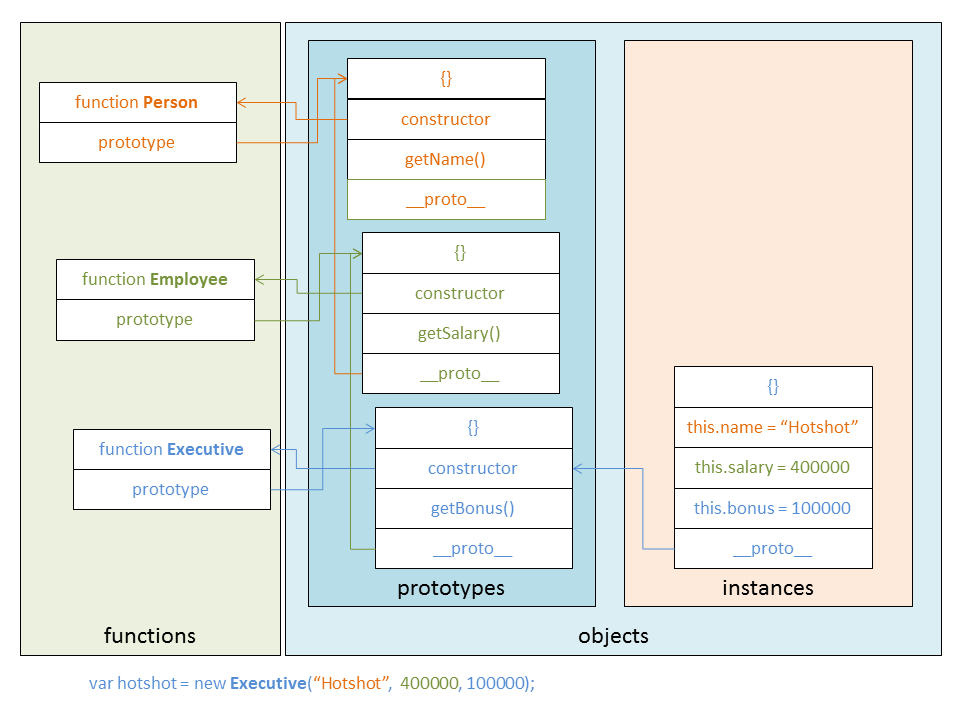
In this blog entry I talked about integration JavaScript Object Diagam (JSOD) with Chrome Devtools. While thinking about it in terms of how to lay out the objects in JSOD I came to this realization i.e. there are three types of objects from the point of view of JSOD. These are as follows:


  • Standard objects [ 1 ] - these are typically created using the new operator on a constructor function. These inherit the constructor [ 4 ] property from the prototype object of the constructor function.  The standard object's  __proto__ [ 7 ] hidden link refers to prototype objects.
  • Prototype objects [ 2 ] - these are objects that are prototypes of functions which are internally created by new operator. These objects have their own constructor [ 5 ] property. The standard object's __proto__  [ 7 ] hidden link (typically) refers to these objects. The prototype property of the constructor functions point to these objects.
  • Function object [ 3 ]- these are function objects used for creation of other object's using new operator. The prototype [ 6 ] property of function objects refer to prototype object.
I hope that JSOD becomes a standard way for diagramming JasvaScript objects.

Friday, March 28, 2014

Chrome extension syntaxit

Here is a simple Chrome Extension - syntaxit.


or
  • git clone https://github.com/sandipchitale/syntaxit.git
  • Install it as unpacked extension (How?) 
You will see this browser action icon in the Chrome toolbar:


Visit any page that has JavaScript code in a pre tag which has not been been syntax colored yet by some other plugin. For example this page.


And then click on the syntaxit icon in the toolbar. Boom...you will see this:


Uses Prismjs syntax coloring library.

Currently assumes JavaScript by default. Tries to guess Java using a simple keyword match.

TODO

  • Implement more sophisticated language recognition
  • Get this extension on Chrome App store Chrome Web Store


Dev Art Submission

Available on Chrome Web Store.


It appears that there are 160 completed entries. So I have 1 in 8 chance to make it to top 20 :)


Friday, March 21, 2014

UPDATE: Overview Plugin for Eclipse

Based on requests from several users I have updated the Overview Plugin. It now allows you to set the size of the font used in the Overview view. The size is also persisted in preferences.


Get it here.

Thursday, March 20, 2014

JavaScript Object Diagram integration with Chrome Devtools | Sources Tab | Scope Variables section

UPDATE: You may want to check out this entry to easily try out the JSOD integration.

In this blog entry I blogged about the JavaScript Object Diagram. In it I mentioned that the JavaScript Object Diagram can be integrated with the Chrome Developer Tools | Sources Tab | Scope Variables section. So I started the implementation and I have finished the implementation.

How does it work?

When the debugee is suspended, in the Sources Tab | Scope Variables section you can see the scope variable. If you right click on a value of a variable you will see the JavaScript Object Diagram menu item in the context menu like so:


And selecting the menu shows this:


Supports:
  • Now support diagramming of arbitrary expression.
    • You can also click on the = button in the cells of object, array and function type properties to load then in the view
  • Pan
    • Using buttons
    • Using mouse drag
    • Using mouse wheel
  • Zoom
    • Using buttons
    • Using Slider
    • Using mouse wheel (hold Ctrl down)
  • Reset
    • Click on home button to pan to origin
    • Click again quickly again to reset zoom to 100%

Try it

You can try it today. 


Follow these instructions:
  • Download and install Chrome Canary from here.
  • Launch it with command:

"c:\Users\...\AppData\Local\Google\Chrome SxS\Application\chrome.exe" --remote-debugging-port=9222 --no-first-run --user-data-dir=C:\temp\devtoolsprofile

  • This basically launches the debug server which can display the list of pages available for debugging.
  • Then go to any page that you want to debug.
  • Create another tab and go to url:

http://localhost:9222/#https://sandipchitaleschromedevtoolsstuff.googlecode.com/git/front_end/inspector.html?experiments=true

or alternatively:

UPDATE: You may want to check out this entry to easily try out the JSOD integration.
  • This will show the list of pages available for debugging as mentioned 3 steps ago. Select the one you want to debug. This will load the my devtools code located at
https://sandipchitaleschromedevtoolsstuff.googlecode.com/git/front_end/inspector.html
  • Now set a breakpoint. When it is hit go to Sources Tab > Scope Variables section, choose a variable you want to diagram and right click on it's value to JavaScript Object Diagram menu item and you will see the diagram (see screenshot above).
I hope this helps JavaScripts beginners understand the JavaScript's prototypical inheritance.

TODO
  • Submit a patch to Chrome Developer Tools.
    • Files a enhancement request Issue 357962 . Attached a patch today (3/29/2014). Please star the issue if you want to see this feature included or at least implemented side by side with devtools.
  • Wait for it to be accepted (hopefully) and may be available optionally
Git repo

BTW I was able to use the excellent GitHub for Windows client to work with the above Google Code git repository. No problem. Simply dragged and dropped the folder from Explorer on top of the GitHub for Windows window.

Stay tuned!

Saturday, March 15, 2014

Angular directive ng-jsod for drawing JavaScipt Object Diagram

UPDATE: I have now integrated the JSOD with Chrome devtools. Check it out! Does not use the AngularJS rective though, instead uses the Chrome devtools framework.

I have been meaning to hack this for long time. The idea is to draw a object diagram of for a JavaScript object. Finally got around to implementing it as a angular directive. It uses excellent jquery-svg library by Keith Wood.

Note: Currently works on Chrome only.

Usage:

in .html head section:

:
:
<link rel="stylesheet" type="text/css" href="css/jquery.svg.css">
:
<script src="http://ajax.googleapis.com/ajax/libs/jquery/1.11.0/jquery.min.js"></script>
<script src="http://code.angularjs.org/1.2.1/angular.min.js"></script>
<script type="text/javascript" src="js/jquery.svg.js"></script>
<script src="js/ngjsod.js"></script>
<script src="js/ngjsodapp.js"></script>
:
:

in .html body section:

:
<ng-jsod object-name="document.location"></ng-jsod>
:

in your app's .js file inject NGJSOD module:

angular.module('NGJSODApp', ['NGJSOD']);

This will yield:


Try it here!


Github Repository

This is an initial attempt. Obviously needs clean up.

TODO

  1. Cleanup. The svg code was written in a brute force fashion. Modularize it,
  2. Better layout, support scrolling, panning, zooming, overview for the svg.
  3. Integrate with Chrome Devtools's Scope Variables section in the Sources tab. Right click on a object to see it's diagram. I am working on this now and will submit the patch to Chrome Dev Tools. Unfortunately the dev tools extension API does not allow to put a context menu on nodes of Scope Variables nodes. If it allowed that I could have simply written a Chrome extension. The idea behind this is that it will help developers understand the JavaScript object structure.
Feedback welcome!

Thursday, March 13, 2014

Enhanced JavaScript inheritance

Even more compact than this but exactly equivalent and a little bit of mind twister....

Note that the "super" function name is specified only once in the constructor function. And if the order of parameters of "super" is consistent and it ignores the extra params the

arguments.callee.prototype.__proto__.constructor.call(this, name, salary);

in Executive can even be replaced by:

arguments.callee.prototype.__proto__.constructor.apply(this, arguments);

making it completely boiler plate.

This will allow private and read-only properties also. Can anyone show how?

Try this Jsfiddle .

Also check out this example based on ngjsod directive which diagrams JavaScript objects.

Code:

function Person(name) {
        this.name = name;
}

Person.prototype.getName = function() {
        return this.name;
}

function Employee(name, salary) {
        // One time initialization of instance methods
        if (arguments.callee.prototype.__proto__ === Object.prototype) {
                arguments.callee.prototype.__proto__ = Person.prototype;
                arguments.callee.prototype.getSalary = function() {
                        return this.salary;
                }
        }
        arguments.callee.prototype.__proto__.constructor.call(this, name);
        this.salary = salary;
}

function Executive(name, salary, bonus) {
        // One time initialization of instance methods
        if (arguments.callee.prototype.__proto__ === Object.prototype) {
                arguments.callee.prototype.__proto__ = Employee.prototype;
                arguments.callee.prototype.getBonus = function() {
                        return this.bonus;
                }
        }
        arguments.callee.prototype.__proto__.constructor.call(this, name, salary);
        this.bonus = bonus;
}

var hotshot = new Executive('Hotshot', 400000, 100000);
var workerbee = new Employee('Workerbee', 100000);


hotshot instanceof Executive => true
hotshot instanceof Employee => true
hotshot instanceof Person => true

workerbee instanceof Executive => false
workerbee instanceof Employee => true
workerbee instanceof Person => true

The same diagram shown using my FireJSOD Firebug extension:


It is my understanding that arguments.callee is going to be deprecated in ES6. No fear, it can simply be replaced by the CTOR function name.

Tuesday, March 11, 2014

Simple JavaScript inheritance


Code:

function Person(name) {
        this.name = name;
}

Person.prototype.getName = function() {
        return this.name;
}

function Employee(name, salary) {
        Person.call(this, name);
        this.salary = salary;
}

Employee.prototype.__proto__ = Person.prototype;

Employee.prototype.getSalary = function() {
        return this.salary;
}

function Executive(name, salary, bonus) {
        Employee.call(this, name, salary);
        this.bonus = bonus;
}

Executive.prototype.__proto__ = Employee.prototype;

Executive.prototype.getBonus = function() {
        return this.bonus;
}

var workerbee = new Employee('Workerbee', 100000);
var hotshot = new Executive('Hotshot', 400000, 100000);

hotshot instanceof Executive => true
hotshot instanceof Employee => true
hotshot instanceof Person => true

workerbee instanceof Executive => false
workerbee instanceof Employee => true
workerbee instanceof Person => true

Picture:


Comments?

Other than use of __proto__  (bad! I know).

Thursday, March 06, 2014

Simple access_token Pattern in Angular JS

In a recent work I did I had to solve the problem of automatic insertion of Authorization header in all subsequent requests to a REST service after authenticating with it. Here is a simple solution I came up with:

(function(){
angular.module('RestClient', [])
.constant('authmap', {})
.config(function($httpProvider) {
    $httpProvider.interceptors.push(function($q, authmap) {
        return {
            'request' : function(config) {
                // Is this http[s] URL
                if (/^http[s]?:\/\//i.test(config.url)) {
                    // Check authmap if it has key that is prefix of config.url
                    var access_token;
                    for (var key in authmap){
                        // Is key a prefix?
                        if (config.url.indexOf(key) === 0) {
                            access_token = authmap[key];
                            break; // Found access token so break
                        }
                    };
                    if (!!access_token) {
                        // Yes, inject Authorization header
                        config.headers.Authorization = 'Bearer ' + access_token;
                    }}
                }
                return config;
            }
        };
    });
})
.factory('AuthenticationService', function($http, authmap) {
    return {
        login : function(target, email, password) {
           var authentication = ...; // Authenticate and get access_token
            // Record access_token for target
            // This will be used by the interceptor to
            // supply Authorization header
            authmap[target] = authentication.access_token;

        },
        isLoggedIn: function(target){
            return !!(authmap[target]);
        },
        logout : function(target) {
            if (!!target) {
                if (this.isLoggedIn(target)) {
                    // Forget access_token for target
                    delete authmap[target];
                }
            }
        }
    };
});
})();

IMHO this approach is better than the approach described here where one globally sets the $http.defaults.headers.common.Authorization header, because that affects all requests.

This was written for angular 1.2+.

The code does not show how you authenticate. It assumes that you got back a authentication object with property access_token in it.

I hope folks find it useful.

Friday, January 24, 2014